ハッカーはFeroxbusterツールでディレクトリスキャンしてウェブサイトの設定情報や重要なデータを検索する

相手を知るための情報収集がReconnaissance(偵察)です。
偵察と言っても、実は地味な作業になります。
しかし、その地味な作業でハッキングの手がかりが見つかるかもしれません。(地味に勝るものはありません!!)
偵察と言っても、実は地味な作業になります。
しかし、その地味な作業でハッキングの手がかりが見つかるかもしれません。(地味に勝るものはありません!!)
目次
Feroxbusterとは
Feroxbusterは、ディレクトリスキャンツールと呼ばれ、ウェブサイトやウェブアプリケーションの中に隠れているファイルやディレクトリを見つけるためのツールです。
これは、コンピューターネットワーク上でお宝のファイルを見つける探検のようなものですね。
ウェブサイトは、多くの場合、見えないページやファイルを持っています。これらのファイルには、ウェブサイトの設定情報や重要なデータが含まれていることがあります。Feroxbusterは、これらの隠れたファイルやディレクトリを見つけるために使われます。
Feroxbusterインストール
Kali Linuxには標準でインストールされていません。
そのため、手動でインストールします。
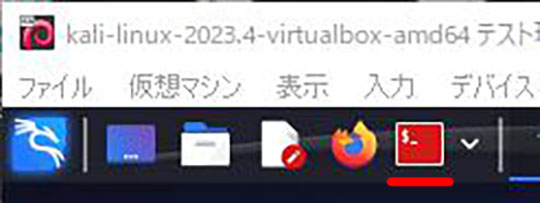
1.ROOTのターミナルを開きます。
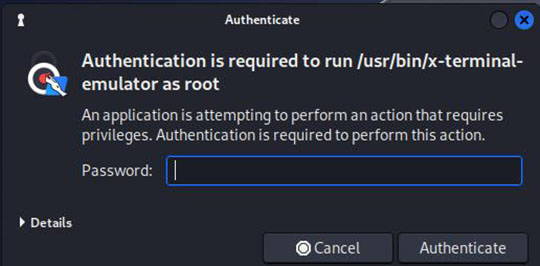
・Kali Linuxのパスワード "kali"を入力して「Authenticate」ボタンを押下します。
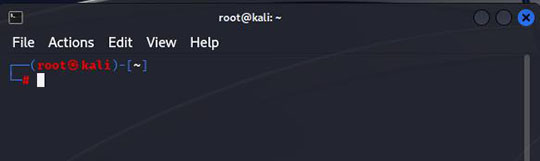
・ターミナルが立ち上がりました。
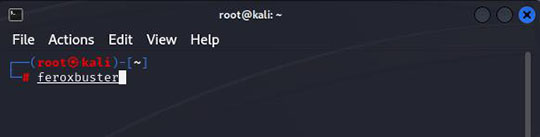
2.Feroxbusterをインストールします。
"feroxbuster"と入力し、Enterキーを押下。
3.インストールしますか?と聞いてくるので"y"を押下。

4.インストール完了したのですが、エラーが表示されました。
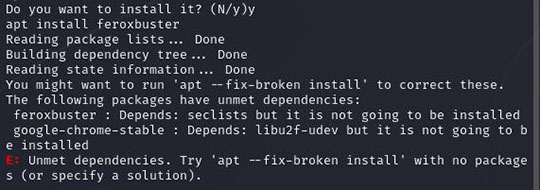
"E: Unmet dependencies. Try 'apt --fix-broken install' with no packages (or specify a solution)."
E: 依存関係が満たされていません。パッケージなしで 'apt --fix-broken install' を試してください (または解決策を指定してください)。
5.'apt --fix-broken install'を実行します。
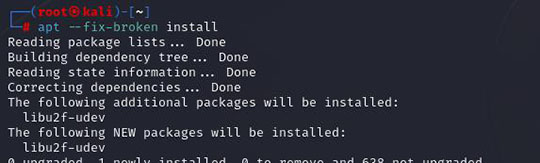
6.再度、feroxbusterをインストールします。
"feroxbuster"と入力し、Enterキーを押下。そして、インストールしますか?と聞いてくるので"y"を押下。
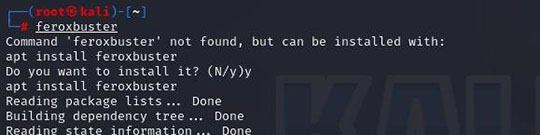
7.これでインストールが完了しました。
ツールと使用方法
使用法: feroxbuster [OPTIONS]
使用例
feroxbuster --url http://10.0.2.6 --depth 2 --wordlist common.txt
※http://10.0.2.6は「owaspbwa」のやられサイトです。
詳しくは、VM VirtualBox6.1でやられサーバOWASP BWAを構築しますをご覧ください。
wordlistは以下のファイルを流用しました。
実行結果と脆弱性の見つけ方
実行結果の最初の部分を見て見ましょう。
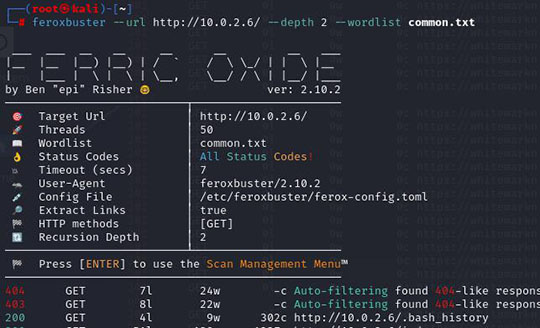
まず、この部分がディレクトリースキャンの設定値になります。
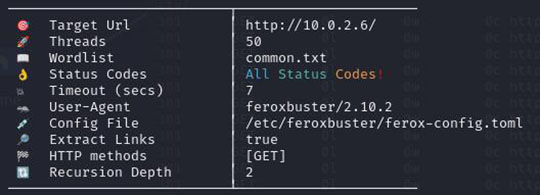
そして、下部がferoxbusterでディレクトリ/ファイルをサーチした結果になります。

左から
①response status code
応答ステータスコード
②http request method
http リクエストメソッド
③of line in response body
③of line in response body
レスポンスボディの行
④of words in response body
④of words in response body
レスポンス本文の単語数
⑤of characters(byte) in response body
⑤of characters(byte) in response body
レスポンス本文の文字数(byte)
⑥uri requested
⑥uri requested
要求された uri
となります。
ここで、良く表示される応答ステータスコードより情報を見ていきます。
(1) 200
リクエストが成功したことを示します。
GET リソースが読み込まれ、メッセージ本文で転送された。
GET リソースが読み込まれ、メッセージ本文で転送された。
(2) 301
リクエストされたリソースの URL が永遠に変更されたことを示します。レスポンスで新しい URL が与えられます。
(3) 302
このレスポンスコードは、リクエストされたリソースの URI が 一時的に 変更されたことを示します。 URI は将来、さらに変更される可能性があります。
(4) 403
認証されていないなどの理由でクライアントにコンテンツのアクセス権がなく、サーバーが適切なレスポンスの返信を拒否していることを示します。
(5) 404
サーバーがリクエストされたリソースを発見できないことを示します。 ブラウザーでは、これは URL が解釈できなかったことを意味します。
(6) 503
サーバーはリクエストを処理する準備ができていないことを示します。
上記の情報より、応答ステータスコード"200" "301" "302"のアドレスの情報を一つ一つ確認して、ハッキングできる情報を探します。
たとえば、プログラムが参照できて、ログイン情報やデータベースのアクセス情報などがプログラムに書き込まれている場合があります。
オプション
【Options】
-h, --help
Print help (see a summary with '-h')
ヘルプを表示する。
-V, --version
Print version
バージョンを表示する。
【Target selection】
-u, --url <URL>
The target URL (required, unless [--stdin || --resume-from] used)
ターゲットURL([--stdin || --resume-from]が使用されていない場合は必須)。
--stdin
Read url(s) from STDIN
STDINからURLを読み込む
--resume-from <STATE_FILE>
State file from which to resume a partially complete scan (ex. --resume-from ferox-1606586780.state)
部分的に完了したスキャンを再開するための状態ファイル (例: --resume-from ferox-1606586780.state)
【Composite settings】
--burp
Set --proxy to http://127.0.0.1:8080 and set --insecure to true
-proxyをhttp://127.0.0.1:8080、--insecureをtrueに設定する。
--burp-replay
Set --replay-proxy to http://127.0.0.1:8080 and set --insecure to true
replay-proxyをhttp://127.0.0.1:8080、--insecureをtrueに設定する。
--smart
Set --auto-tune, --collect-words, and --collect-backups to true
auto-tune、--collect-words、--collect-backups を true に設定する。
--thorough
Use the same settings as --smart and set --collect-extensions to true
smartと同じ設定を使用し、--collect-extensionsをtrueに設定する。
【Proxy settings】
-p, --proxy <PROXY>
Proxy to use for requests (ex: http(s)://host:port, socks5(h)://host:port)
リクエストに使うプロキシ (例: http(s)://host:port, socks5(h)://host:port)
-P, --replay-proxy <REPLAY_PROXY>
Send only unfiltered requests through a Replay Proxy, instead of all requests
すべてのリクエストではなく、フィルタリングされていないリクエストだけをリプレイプロキシ経由で送る。
-R, --replay-codes <REPLAY_CODE>...
Status Codes to send through a Replay Proxy when found (default: --status-codes value)
見つかったときにリプレイプロキシを通して送るステータスコード (デフォルトは --status-codes の値)
【Request settings】
-a, --user-agent <USER_AGENT>
Sets the User-Agent (default: feroxbuster/2.10.2)
ユーザーエージェントを設定する (デフォルト: feroxbuster/2.10.2)
-A, --random-agent
Use a random User-Agent
ランダムなUser-Agentを使う
-x, --extensions <FILE_EXTENSION>...
File extension(s) to search for (ex: -x php -x pdf js); reads values (newline-separated) from file if input starts with an @ (ex: @ext.txt)
検索するファイルの拡張子 (例: -x php -x pdf js); 入力が @ で始まる場合、ファイルから値 (改行区切り) を読み込む (例: @ext.txt)
-m, --methods <HTTP_METHODS>...
Which HTTP request method(s) should be sent (default: GET)
どのHTTPリクエスト・メソッドを送るか(デフォルト:GET
--data <DATA>
Request's Body; can read data from a file if input starts with an @ (ex: @post.bin)
入力が@で始まる場合、ファイルからデータを読み込むことができる (例: @post.bin)
-H, --headers <HEADER>...
Specify HTTP headers to be used in each request (ex: -H Header:val -H 'stuff: things')
各リクエストで使用するHTTPヘッダを指定する (例: -H Header:val -H 'stuff: things')
-b, --cookies <COOKIE>...
Specify HTTP cookies to be used in each request (ex: -b stuff=things)
各リクエストで使用するHTTPクッキーを指定する (例: -b stuff=things)
-Q, --query <QUERY>...
Request's URL query parameters (ex: -Q token=stuff -Q secret=key)
リクエストのURLクエリーパラメーター (例: -Q token=stuff -Q secret=key)
-f, --add-slash
Append / to each request's URL
各リクエストのURLに/をつける
【Request filters】
--dont-scan <URL>...
URL(s) or Regex Pattern(s) to exclude from recursion/scans
再帰/スキャンから除外するURL(複数可)または正規表現パターン(複数可
【Response filters】
-S, --filter-size <SIZE>...
Filter out messages of a particular size (ex: -S 5120 -S 4927,1970)
特定のサイズのメッセージを除外する (例: -S 5120 -S 4927,1970)
-X, --filter-regex <REGEX>...
Filter out messages via regular expression matching on the response's body (ex: -X '^ignore me$')
応答本文の正規表現マッチでメッセージを除外する (例: -X '^ignore me$')
-W, --filter-words <WORDS>...
Filter out messages of a particular word count (ex: -W 312 -W 91,82)
特定の単語数のメッセージを除外する (例: -W 312 -W 91,82)
-N, --filter-lines <LINES>...
Filter out messages of a particular line count (ex: -N 20 -N 31,30)
特定の行数のメッセージを除外する (例: -N 20 -N 31,30)
-C, --filter-status <STATUS_CODE>...
Filter out status codes (deny list) (ex: -C 200 -C 401)
ステータスコード(拒否リスト)を除外する (例: -C 200 -C 401)
--filter-similar-to <UNWANTED_PAGE>...
Filter out pages that are similar to the given page (ex. --filter-similar-to http://site.xyz/soft404)
指定されたページに似ているページを除外する (例: --filter-similar-to http://site.xyz/soft404)
-s, --status-codes <STATUS_CODE>...
Status Codes to include (allow list) (default: All Status Codes)
含めるステータス・コード (許可リスト) (デフォルト: すべてのステータス・コード)
【Client settings】
-T, --timeout <SECONDS>
Number of seconds before a client's request times out (default: 7)
クライアントのリクエストがタイムアウトするまでの秒数 (デフォルト: 7)
-r, --redirects
Allow client to follow redirects
クライアントがリダイレクトに従うことを許可する
-k, --insecure
Disables TLS certificate validation in the client
クライアントのTLS証明書検証を無効にする
--server-certs <PEM|DER>...
Add custom root certificate(s) for servers with unknown certificates
未知の証明書を持つサーバ用にカスタムルート証明書を追加する。
--client-cert <PEM>
Add a PEM encoded certificate for mutual authentication (mTLS)
相互認証(mTLS)のためにPEMエンコードされた証明書を追加する
--client-key <PEM>
Add a PEM encoded private key for mutual authentication (mTLS)
相互認証(mTLS)用にPEMエンコードされた秘密鍵を追加する。
【Scan settings】
-t, --threads <THREADS>
Number of concurrent threads (default: 50)
同時実行スレッド数(デフォルト:50)
-n, --no-recursion
Do not scan recursively
再帰的にスキャンしない
-d, --depth <RECURSION_DEPTH>
Maximum recursion depth, a depth of 0 is infinite recursion (default: 4)
最大再帰深度、深度0は無限再帰(デフォルト:4)
--force-recursion
Force recursion attempts on all 'found' endpoints (still respects recursion depth)
すべての 'found' エンドポイントで再帰を試行する。
--dont-extract-links
Don't extract links from response body (html, javascript, etc...)
レスポンスボディからリンクを抽出しない (html、javascript など)。
-L, --scan-limit <SCAN_LIMIT>
Limit total number of concurrent scans (default: 0, i.e. no limit)
同時スキャンの総数を制限する (デフォルト: 0、すなわち制限なし)
--parallel <PARALLEL_SCANS>
Run parallel feroxbuster instances (one child process per url passed via stdin)
feroxbusterインスタンスを並列に実行する (標準入力経由で渡されたurlごとに子プロセスを1つ)
--rate-limit <RATE_LIMIT>
Limit number of requests per second (per directory) (default: 0, i.e. no limit)
1秒あたりのリクエスト数を制限する (ディレクトリ単位) (デフォルト: 0、つまり制限なし)
--time-limit <TIME_SPEC>
Limit total run time of all scans (ex: --time-limit 10m)
全スキャンの総実行時間を制限する (例: --time-limit 10m)
-w, --wordlist <FILE>
Path or URL of the wordlist
ワードリストのパスまたはURL
--auto-tune
Automatically lower scan rate when an excessive amount of errors are encountered
過剰なエラーが発生した場合、スキャン・レートを自動的に下げる。
--auto-bail
Automatically stop scanning when an excessive amount of errors are encountered
過剰な量のエラーが発生した場合、自動的にスキャンを停止する。
-D, --dont-filter
Don't auto-filter wildcard responses
ワイルドカード応答を自動フィルタリングしない
【Dynamic collection settings】
-E, --collect-extensions
Automatically discover extensions and add them to --extensions (unless they're in --dont-collect)
拡張機能を自動的に検出し、--extensions に追加する(--dont-collect にある場合を除く)。
-B, --collect-backups [<collect_backups>...]
Automatically request likely backup extensions for "found" urls (default: ~, .bak, .bak2, .old, .1)
見つかった "URLのバックアップ拡張子を自動的に要求する (デフォルト: ~, .bak, .bak2, .old, .1)
-g, --collect-words
Automatically discover important words from within responses and add them to the wordlist
応答から重要な単語を自動的に検出し、単語リストに追加します。
-I, --dont-collect <FILE_EXTENSION>...
File extension(s) to Ignore while collecting extensions (only used with --collect-extensions)
拡張子の収集時に無視するファイル拡張子(-collect-extensions でのみ使用
【Output settings】
-v, --verbosity...
Increase verbosity level (use -vv or more for greater effect. [CAUTION] 4 -v's is probably too much)
冗長度レベルを上げる(より大きな効果を得るには-vv以上を使用。 [注意] 4つの-vは多すぎるかもしれない)
--silent
Only print URLs (or JSON w/ --json) + turn off logging (good for piping a list of urls to other commands)
URL(または--jsonを使ったJSON)のみを表示し、ログを出力しない(URLのリストを他のコマンドにパイプするのに適している)。
-q, --quiet
Hide progress bars and banner (good for tmux windows w/ notifications)
プログレスバーとバナーを非表示にする(tmuxのウィンドウを通知する場合に有効)
--json
Emit JSON logs to --output and --debug-log instead of normal text
通常のテキストではなく、JSONログを--outputと--debug-logに出力する。
-o, --output <FILE>
Output file to write results to (use w/ --json for JSON entries)
結果を書き込む出力ファイル(JSONエントリーの場合は--jsonと一緒に使う)
--debug-log <FILE>
Output file to write log entries (use w/ --json for JSON entries)
ログ・エントリーを書き込む出力ファイル(JSONエントリーの場合は--jsonと一緒に使う)
--no-state
Disable state output file (*.state)
状態出力ファイル(*.state)を無効にする。
【Update settings】
-U, --update
Update feroxbuster to the latest version
feroxbusterを最新版に更新する
ハッカーはFeroxbusterツールでディレクトリスキャンしてウェブサイトの設定情報や重要なデータを検索するのまとめ
ホワイトハッカーは、このフェロックスバスターツールを使って、ウェブサイトのセキュリティをテストし、ウェブサイトの所有者が気づかなかった、潜在的な問題を見つけ出します。これにより、ウェブサイトのセキュリティの向上に役立ちます。